Punchout — live demo
Try it yourself. Right now.
This is the real, running system — not a video. Log a punch item like a field manager, scan the QR like a subcontractor, and get the actual branded report emailed to you. No app. No login. Just scan.
Start the Live Demo
Pop in your info so the demo can email a real sample report straight to your inbox.
sheet d-01 · self-serve walkthrough · 4 steps

No sales deck past this point
You're about to walk into the live system.
Same code, same screens, same reports our builders run every day — with sample data you can't break.
uBuild Systems — systems built around your workflow
Walk a unit & log a punch item
Open the field app — pick a unit and trade, type a quick issue (e.g. "Touch-up paint, kitchen"), snap a photo if you like, and hit submit. This is exactly what your team does on a walkthrough.
I've logged an item — show me the next step ▸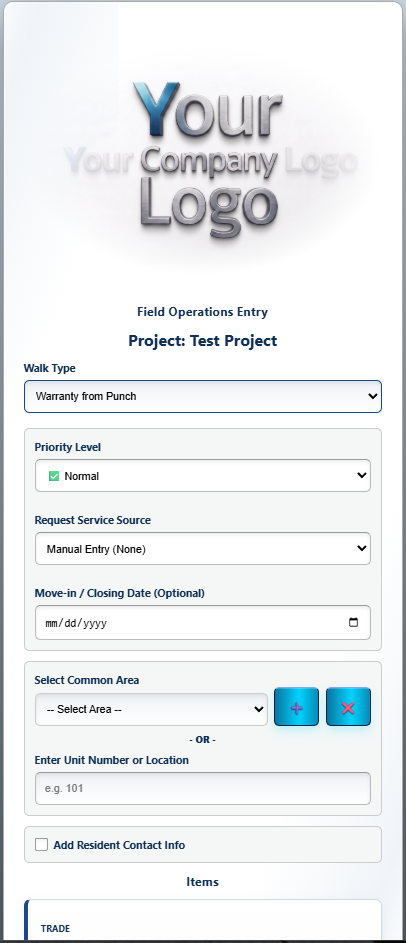
Become the subcontractor — scan to see your item
Now you're the sub. Scan this QR with your phone (no app, no login) and pick the same trade you used in Step 1 — there's your item. Mark it complete and add a proof photo. (Forgot the trade? The sub view will point you to the latest logged item.)
scan — sub portal
Get the branded report in your inbox
In that sub view, tap "Email me this report" — the real, branded PDF punch-list report lands in your inbox seconds later. That's the exact report your clients and vendors would receive (with your logo on a live account).
See the office dashboard
Finally, peek at the back-office side — where every walk, photo, and completion rolls up in real time, and one click emails an entire trade. (In the demo, "Email Trades" sends the sample to you.)
Open the Office Dashboard →